Analyzers
Label Sounds
Find the sounds in a recording, separated by silences, and label each one.
Label Sounds works through the selection looking for passages above a level you set, separated by silences long enough to count as gaps, and writes a label for each sound it finds. It is how you turn a long recording of separate takes, tracks or spoken items into something you can navigate, split or export piece by piece.
Where to find it
Analyze → Label sounds, with audio selected.
Controls
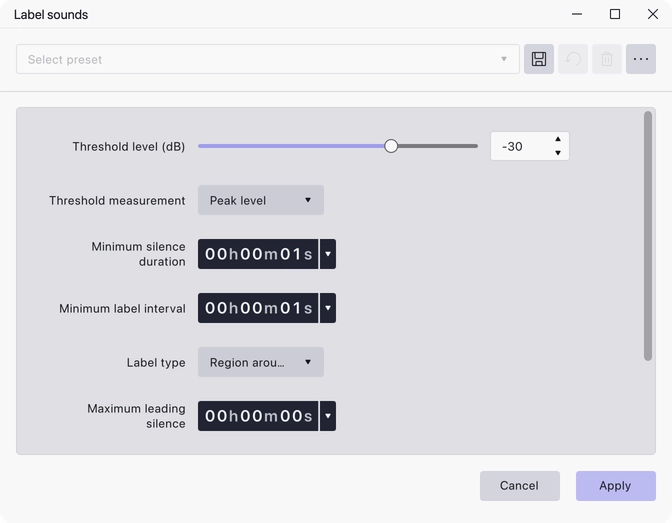
- Threshold level (dB) — the level a passage has to reach to count as sound. Range −100 to 0 dB, default −30 dB.
- Threshold measurement — how the level is measured: Peak level, Average level or RMS level. Default Peak level.
- Minimum silence duration — how long a quiet passage must last before it is treated as a gap between sounds. Range 0.01 to 3600 seconds, default 1 second.
- Minimum label interval — the shortest gap allowed between one label and the next; sounds closer together than this are labelled as one. Range 0.01 to 7200 seconds, default 1 second.
- Label type — Point before sound, Point after sound, Region around sounds or Region between sounds. Default Region around sounds.
- Maximum leading silence — how much of the silence before a sound to include in its label, in seconds. Minimum 0, default 0.
- Maximum trailing silence — how much of the silence after a sound to include in its label, in seconds. Minimum 0, default 0.
- Label text — the text to give each label. Default
Sound ##1.
Notes
In Label text, a run of # characters is replaced by an incrementing
number, and the digits immediately after it set the number to start from. The
default Sound ##1 therefore produces Sound 01, Sound 02 and so on — two
digits, starting at one. Text with no # in it gives every label the same
name.
The two duration settings do different jobs and both matter. Minimum silence duration decides what counts as a gap at all, so raise it when pauses inside a single item are being read as boundaries. Minimum label interval merges labels that ended up too close together afterwards.
Region around sounds is the type to choose if you intend to export the labelled pieces as separate files, since each label then spans the audio itself. The point types are better for marking positions to navigate to.
Try RMS level rather than Peak level when a recording has occasional sharp transients in the gaps — an RMS measurement is much less easily tripped by a single click.
Last updated