Effects
Adjustable Fade
Fade the selection using a curve shape and start and end levels that you choose.
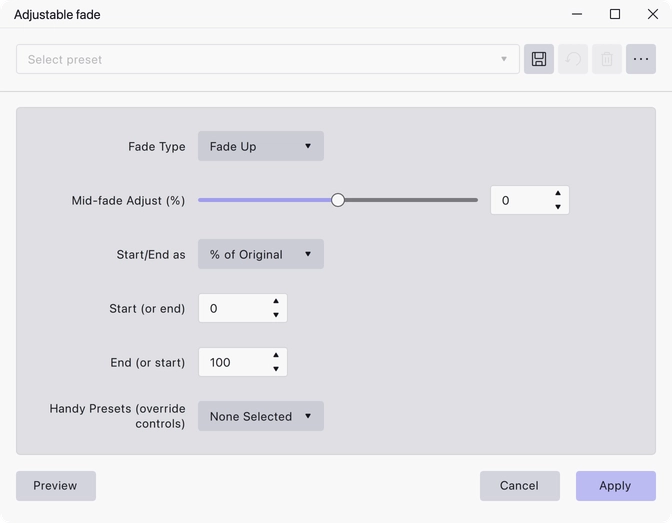
Fades the selection up or down using a curve you shape yourself, rather than the fixed shape of Fade in and Fade out. Reach for it when you want a gentler start, a faster tail, or a fade that only drops part of the way rather than all the way to silence.
Where to find it
Effect → Fading → Adjustable fade.
Controls
- Fade Type — Fade Up, Fade Down, S-Curve Up or S-Curve Down. Fade Up is the default.
- Mid-fade Adjust (%) — −100 to 100, default 0. Bends the middle of the curve away from a straight line without moving the start and end points.
- Start/End as — whether the two level values below are read as % of Original (the default) or as dB Gain.
- Start (or end) — the level the fade begins at. Default 0.
- End (or start) — the level the fade finishes at. Default 100.
- Handy Presets (override controls) — None Selected, Linear In, Linear Out, Exponential In, Exponential Out, Logarithmic In, Logarithmic Out, Rounded In, Rounded Out, Cosine In, Cosine Out, S-Curve In, S-Curve Out. Picking anything other than None Selected overrides the settings above.
Notes
Which of the two level controls is the start and which is the end depends on the Fade Type, which is why they are labelled “Start (or end)” and “End (or start)”.
The effect has a preview, so you can hear the shape before committing to it.
Last updated