Effects
Loudness Normalisation
Set the selection to a target loudness rather than a target peak level.
This effect measures how loud the selection actually sounds and applies one gain change to bring it to a target you choose. Because it works from a loudness measurement rather than the highest peak, it is the right tool when several tracks need to sit at a comparable level, or when a delivery specification names a loudness figure.
Where to find it
Effect → Volume and compression → Loudness Normalization, with audio selected. The dialog itself is headed Normalize loudness.
Controls
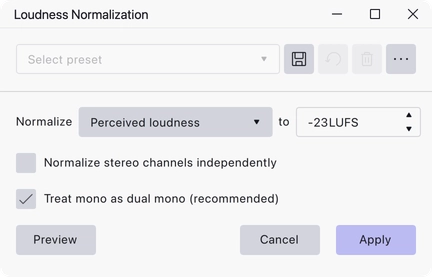
- Normalize — chooses the measurement. Perceived loudness measures in LUFS, following the broadcast loudness model; RMS measures average level in dB.
- to — the target. In perceived loudness mode the units are LUFS and the default is −23 LUFS; in RMS mode they are dB and the default is −20 dB. Either can be set between −145 and 0.
- Normalize stereo channels independently — measure and correct the left and right channels separately rather than applying one gain to the pair. Off by default.
- Treat mono as dual mono (recommended) — measure a mono track as if it were the same signal on both channels, which is how it will be heard on playback. On by default, and available only in perceived loudness mode.
Notes
−23 LUFS is the EBU R 128 target and a reasonable default for spoken word intended for broadcast. If you are producing for streaming platforms their published targets are usually a few LU higher.
Normalising the channels independently changes the stereo balance, so leave it off for ordinary stereo material and reach for it only when the two channels are genuinely separate recordings.
Last updated