Generators
Rhythm track
Generate a click or metronome track at a set tempo, time signature and length.
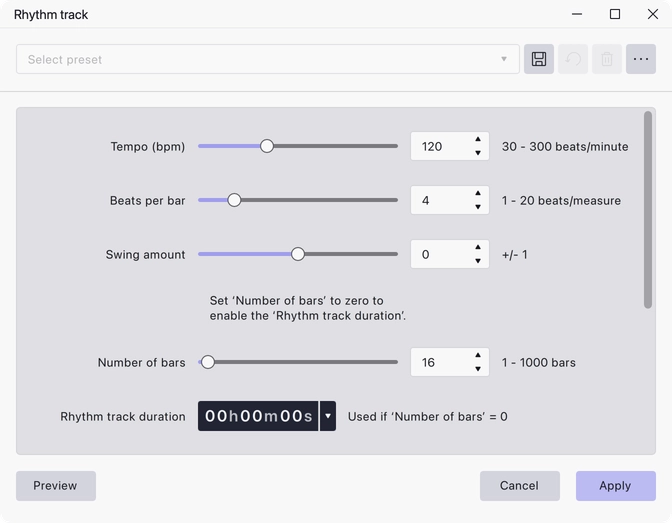
Generates a click track: a steady sequence of beats at a tempo you set, with a stronger sound on the first beat of each bar. Record against it to keep time, or use it as a timing reference when lining material up.
Where to find it
The Generate menu.
Controls
- Tempo (bpm) — 30 to 300, default 120.
- Beats per bar — 1 to 20, default 4. The first beat of each bar gets the strong sound.
- Swing amount — −1 to 1, default 0. Shifts alternate beats early or late to give a swung feel.
- Number of bars — 0 to 1000, default 16. Set this to zero to use Rhythm track duration instead.
- Rhythm track duration — a length in time, default 0. Used only when Number of bars is 0.
- Start time offset — default 0. Silence inserted before the first beat.
- Beat sound — Metronome Tick, Ping (short), Ping (long), Cowbell, Resonant Noise, Noise Click, Drip (short) or Drip (long). Metronome Tick is the default.
- MIDI pitch of strong beat — 18 to 116, default 84.
- MIDI pitch of weak beat — 18 to 116, default 80.
Notes
Length is set either as a number of bars or as a duration, never both. Leave Number of bars at its default to work in bars; set it to 0 and fill in Rhythm track duration to match an existing recording’s length instead.
Making the strong and weak beats the same pitch gives an unaccented click.
Last updated