Effects
Delay
Add a series of decaying repeats to the selection, optionally shifting pitch or spacing.
Adds a run of repeats after the selected audio, each one quieter than the last. Beyond a plain echo it can change the spacing of the repeats over time and shift their pitch, which makes it useful for rhythmic and special effects as well as for simple ambience.
Where to find it
Effect → Delay and reverb → Delay.
Controls
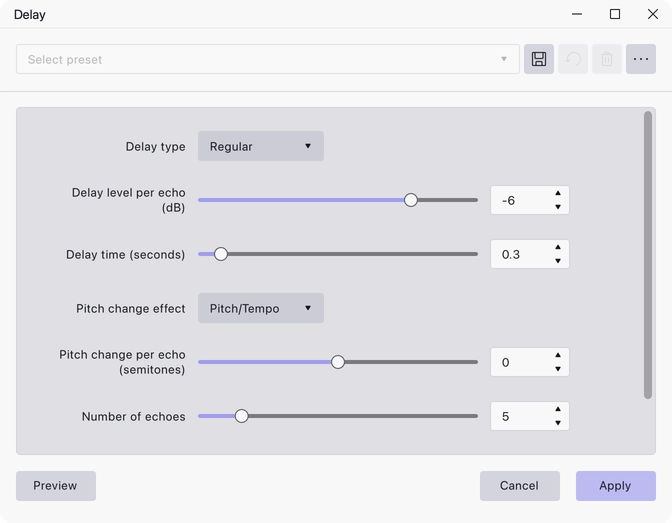
- Delay type — Regular, Bouncing Ball or Reverse Bouncing Ball. Regular is the default and spaces the repeats evenly. Bouncing Ball starts with wide gaps that close up as the repeats go on, like a ball settling; Reverse Bouncing Ball does the opposite and spreads them out.
- Delay level per echo (dB) — −30 to 1, default −6. How much quieter each repeat is than the one before.
- Delay time (seconds) — 0 to 5, default 0.3. The gap between repeats.
- Pitch change effect — Pitch/Tempo, Low-quality Pitch Shift or High-quality Pitch Shift. Pitch/Tempo is the default.
- Pitch change per echo (semitones) — −2 to 2, default 0. At 0 no pitch shifting is applied.
- Number of echoes — 1 to 30, default 5.
- Allow duration to change — Yes or No. Yes is the default.
Notes
The three pitch-change methods behave differently. Pitch/Tempo simply resamples, so the repeats change speed as well as pitch. Low-quality Pitch Shift keeps the timing but sounds rougher. High-quality Pitch Shift uses a phase vocoder and is the cleanest, at the cost of processing time.
The repeats need room after the selection. With Allow duration to change set to Yes the track grows to fit them; set to No, the output is trimmed back to the original selection length and any repeats that would have fallen beyond it are cut off.
Last updated