Effects
Reverb
Place a dry recording in a room by adding a dense wash of reflections.
Reverb simulates the reflections of a space, turning a close-miked, dead recording into one that sounds as though it happened somewhere. It is built around a room-size model rather than a specific measured space, so the controls describe the room and how bright it is rather than naming a preset venue.
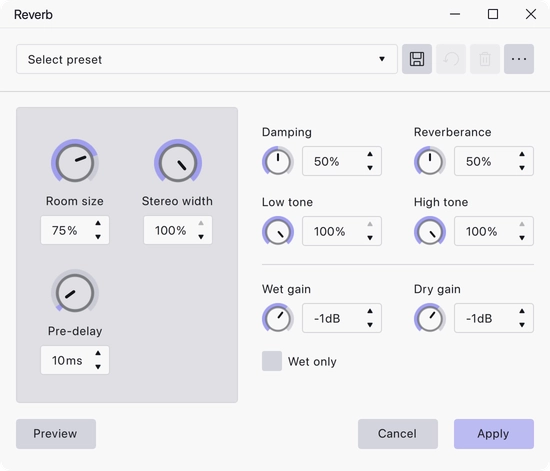
Where to find it
Effect → Delay and reverb → Reverb, with audio selected. Reverb also works as a track effect: add it from a track’s effects panel to hear it live during playback without altering the audio — see Realtime Effects.
Controls
The three main settings are large knobs on the left; the rest are smaller knobs alongside.
- Room size — how large the simulated space is, as a percentage. Range 0 to 100, default 75.
- Stereo width — how far the reflections are spread across the stereo image, as a percentage. Range 0 to 100, default 100.
- Pre-delay — the gap between the dry sound and the first reflections, in ms. Range 0 to 200, default 10.
- Damping — how quickly high frequencies are absorbed as the reverb decays, as a percentage. Range 0 to 100, default 50.
- Reverberance — how long the reverb takes to die away, as a percentage. Range 0 to 100, default 50.
- Low tone — the amount of low frequency in the reverb, as a percentage. Range 0 to 100, default 100.
- High tone — the amount of high frequency in the reverb, as a percentage. Range 0 to 100, default 100.
- Wet gain — the level of the reverb itself, in dB. Range −20 to 10, default −1.
- Dry gain — the level of the original signal, in dB. Range −20 to 10, default −1.
- Wet only — output the reverb alone, with none of the dry signal. Off by default.
Notes
Pre-delay is the control that keeps a voice intelligible in a large space: a small gap before the reflections arrive separates the words from the wash behind them.
Wet only is what you use to put the reverb on a track of its own, which you can then balance, equalise or fade independently of the dry recording.
The reverb tail continues past the end of the original sound, so include some silence at the end of the selection for it to occupy.
A set of factory presets ships with the effect and can be loaded from the presets bar in the effect dialog.
Last updated