Effects
Clip Fix
Rebuild the flattened tops of clipped waveforms by interpolating across them.
Repairs audio that was recorded too loud and had its peaks flattened off. Clip Fix finds each clipped region, measures the slope of the waveform on either side of it, and interpolates a curve across the gap, so the peak is restored to something like the shape it would have had.
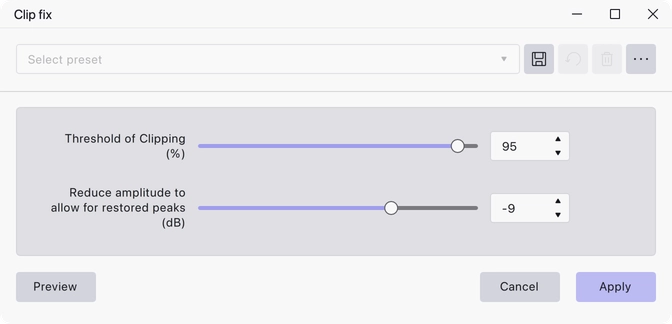
Where to find it
Effect → Noise removal and repair → Clip fix.
Controls
- Threshold of Clipping (%) — 0 to 100, default 95. Samples at or above this percentage of the peak level are treated as clipped. Lower it if only the worst clipping is being caught; raise it if the effect is altering audio that was not actually clipped.
- Reduce amplitude to allow for restored peaks (dB) — −30 to 0, default −9. The restored peaks are taller than the flat tops they replace, so the whole selection is turned down by this amount to leave room for them.
Notes
Clip Fix reconstructs a plausible peak; it cannot recover audio that was never recorded. It works best on lightly clipped material where the flattened sections are short. Badly clipped recordings will still sound distorted afterwards.
Apply it before any other processing, and expect the result to be quieter than the original because of the amplitude reduction.
Last updated