Toolbars
Tools
The editing tools: toggles that change what clicking does, and buttons that act on the selection.
The editing tools: toggles that change what clicking does, and buttons that act on the selection.
Clip Gain

Turns on envelope editing, so you can draw volume changes across a clip rather than setting one level for the whole thing. The button is labelled Clip envelope in the toolbar.
It is a toggle: it stays pressed while envelope editing is on, and clicking it again returns you to normal editing.
It appears in every workspace.
A clip’s envelope is drawn on the clip itself, so the shape is visible without leaving the track.
Split Tool

Turns on the split tool. While it is on, clicking a clip splits it at that point instead of selecting it. The button is labelled Cut / Split in the toolbar.
It is a toggle and stays pressed while the tool is active. The current design gives it the S key.
It appears in the Classic and Modern workspaces; the Music workspace leaves it out.
Toggle Spectral View

Switches the track display from a waveform to a spectrogram, which shows frequency against time instead of amplitude against time. The button is labelled Spectral view in the toolbar.
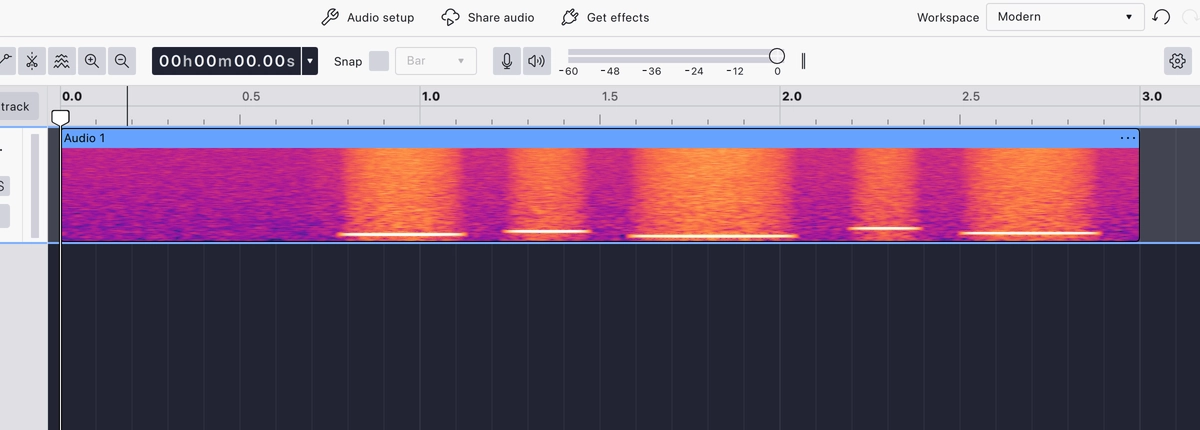
It is a toggle and stays pressed while spectral view is on.
It appears in the Modern workspace only; the Classic and Music workspaces leave it out.
Cut

Removes the selected audio and puts it on the clipboard, ready to paste elsewhere.
The clipboard group of Cut, Copy and Paste appears in the Classic workspace only; the other workspaces leave these three out.
Copy

Puts the selected audio on the clipboard without removing it.
Like the rest of the clipboard group, it appears in the Classic workspace only.
Paste

Inserts whatever is on the clipboard at the edit cursor.
Like the rest of the clipboard group, it appears in the Classic workspace only.
Trim

Keeps the selected audio and removes everything outside it, trimming the clip down to the selection.
Trim and Silence sit together because they are opposites: Trim keeps the selection and discards the rest, Silence keeps the rest and empties the selection.
It appears in the Classic and Music workspaces.
Silence

Replaces the selected audio with silence, leaving the clip the same length.
Because the length does not change, everything after the selection stays where it is, which is useful for removing a cough or a click without shifting the timing of what follows.
It appears in the Classic and Music workspaces.
Last updated