Effects
Click Removal
Find and remove clicks and pops across a whole selection.
Click Removal scans the selection for the short, sharp spikes typical of vinyl crackle and digital dropouts, and smooths out the ones it finds. Unlike Repair it works over a long stretch of audio, so it is the tool for a whole side of a record rather than one bad sample.
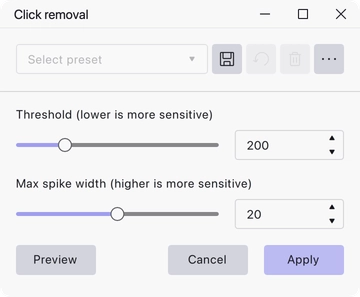
Where to find it
Effect → Noise removal and repair → Click removal, with audio selected.
Controls
- Threshold (lower is more sensitive) — how much a spike has to stand out from its surroundings before it counts as a click. Range 0 to 900, default 200.
- Max spike width (higher is more sensitive) — the widest spike the effect will treat as a click. Range 0 to 40, default 20.
Notes
Both sliders trade thoroughness against damage. Lowering the threshold or raising the maximum width catches more clicks, but also starts catching legitimate transients — drum hits, consonants, guitar picking — and softening them.
Work up from the defaults rather than down from the extremes, and listen to the result on the busiest passage in the selection, since that is where over-aggressive settings show first.
Last updated