Effects
Bass and Treble
Boost or cut the low and high ends with two shelf filters.
Bass and Treble is a two-band tone control: one shelf filter lifts or lowers the low end, another does the same at the top. It is the quickest way to warm up or brighten a track when you do not need the precision of a full equaliser.
Where to find it
Effect → EQ and filters → Bass and Treble, with audio selected.
Controls
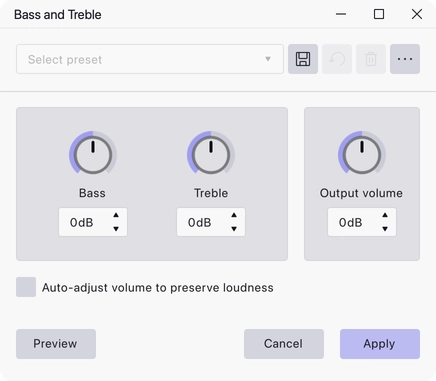
Bass and Treble are knobs on the left, output volume on the right, with a checkbox underneath.
- Bass — boost or cut the low end, in dB. Range −30 to 30 dB.
- Treble — boost or cut the high end, in dB. Range −30 to 30 dB.
- Output volume — a level trim applied after the two filters, in dB. Range −30 to 30 dB.
- Auto-adjust volume to preserve loudness — move the output volume automatically as you boost or cut, so the overall level stays roughly where it started.
Notes
Boosting is the tempting move but cutting is usually the better one: pulling down the band that is in the way leaves more headroom than pushing up the band you want. Watch for clipping if you do boost heavily, and use Output volume to pull the result back down.
Last updated