Analyzers
Measure RMS
Report the average level of the selection in dB.
Measure RMS calculates the root mean square level of the selected audio and reports it in decibels. RMS tracks how loud something actually sounds far better than the peak level does, so it is the number to compare when you are matching one recording against another.
Where to find it
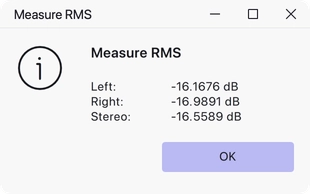
Analyze → Measure RMS, with audio selected.
There are no settings: the effect measures the selection and shows the result.
What it reports
For a mono selection, one figure, labelled Mono.
For a stereo selection, three: Left and Right for the two channels separately, and Stereo for the two combined.
Notes
Nothing is changed and nothing is added to the project — the measurement appears as a message and that is all.
The figure covers the whole selection, so a selection that includes silence or long pauses reads lower than the passage you were interested in. Select a representative stretch of the actual material.
Two recordings matched by RMS will sound about equally loud even if their peak levels differ considerably, which is why this measurement, rather than the peak, is the one to use before mixing takes together.
Last updated