Effects
Sliding Stretch
Change tempo and pitch continuously across the selection, from a starting amount to a finishing amount.
Sliding stretch sets a value at the start of the selection and a different one at the end, then moves smoothly between them. That covers a tape-style slow-down or speed-up, and it also covers a plain constant change: set the initial and final figures to the same number.
Where to find it
Effect → Pitch and tempo → Sliding stretch, with audio selected.
Controls
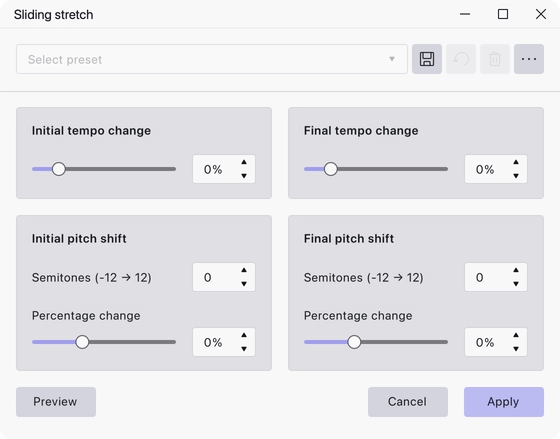
Four cards, each with a slider and a matching numeric field.
- Initial tempo change — the tempo change at the start of the selection, as a percentage. Range −90% to 500%, default 0.
- Final tempo change — the tempo change at the end of the selection, as a percentage. Range −90% to 500%, default 0.
- Initial pitch shift — the pitch shift at the start, in semitones (range −12 to 12) or as a percentage (range −50% to 100%). Default 0.
- Final pitch shift — the pitch shift at the end, on the same two scales. Default 0.
Notes
Tempo and pitch are independent here: you can slow a passage down without dropping its pitch, or bend the pitch while the tempo holds steady.
A positive tempo change makes the selection shorter, so the audio after it moves earlier in the track. Bear that in mind when only part of a track is selected.
For a constant change across the whole selection, set both tempo fields — or both pitch fields — to the same value. This is the effect that replaces Audacity 3’s Change Tempo and Change Speed.
Last updated