Effects
Noise Gate
Attenuate or silence audio that falls below a threshold, to clean up gaps between sounds.
Turns the level down whenever the audio drops below a threshold, so the quiet gaps between words or notes lose their background noise while the wanted sound passes through untouched. It also has an analysis mode that reports the noise level in the selection, to help you choose the threshold.
Where to find it
Effect → Noise removal and repair → Noise gate.
Controls
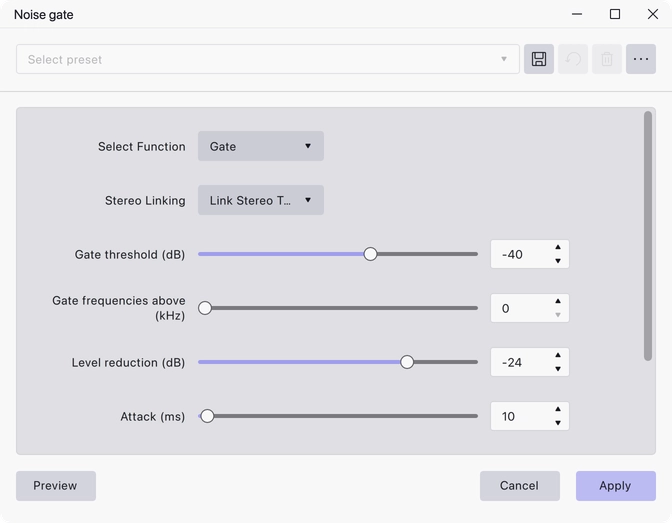
- Select Function — Gate, or Analyze Noise Level. Gate is the default; Analyze measures the selection instead of processing it.
- Stereo Linking — Link Stereo Tracks or Don’t Link Stereo. Linked is the default, so both channels open and close together.
- Gate threshold (dB) — −96 to −6, default −40. Audio below this level is attenuated.
- Gate frequencies above (kHz) — 0 to 10, default 0. At 0 the gate acts on the whole signal; set higher and only content above that frequency is gated.
- Level reduction (dB) — −100 to 0, default −24. How much quieter the gated audio becomes. This is an amount of gain rather than a fixed floor.
- Attack (ms) — 1 to 1000, default 10. How quickly the gate opens.
- Hold (ms) — 0 to 2000, default 50. How long the gate stays open after the level drops back below the threshold.
- Decay (ms) — 10 to 4000, default 100. How quickly the gate closes once the hold time has passed.
Notes
Run Analyze Noise Level on a stretch of pure background noise first: it reports the level, which gives you a starting point for the threshold. Set the threshold above the noise but below the quietest wanted sound.
Level reduction of −96 dB or lower silences the gated audio completely. Milder settings usually sound more natural, because the noise ducking under the speech is less noticeable than noise switching on and off.
The gate looks ahead by the attack time, so it is already fully open by the time the signal crosses the threshold. That stops it clipping the front of words and other transients.
Last updated