Effects
Limiter
Hold peaks below a ceiling without audibly changing the rest of the audio.
The Limiter is a compressor set up for one job: stopping peaks from going past a ceiling. It acts only on the loudest moments and leaves everything below the threshold alone, so it is the usual last step before exporting a mix that must not clip.
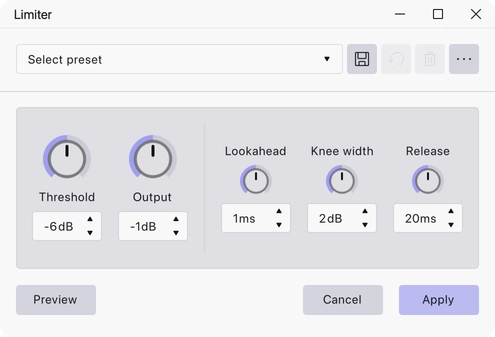
Where to find it
Effect → Volume and compression → Limiter, with audio selected. The Limiter also works as a track effect: add it from a track’s effects stack to hear it live without altering the audio on disk.
Controls
Each setting is a knob with a numeric readout.
- Threshold — the level above which limiting starts, in dB. Range −30 to 0 dB, default −6 dB.
- Output — the level the limited signal is brought back up to, in dB. Range −30 to 0 dB, default −1 dB.
- Knee width — how gradually limiting comes in around the threshold, in dB. 0 gives a hard corner. Range 0 to 10 dB, default 2 dB.
- Lookahead — how far ahead the limiter reads so it can catch a transient before it arrives, in ms. Range 0 to 50 ms, default 1 ms.
- Release — how quickly the limiter lets go once the signal drops back below the threshold, in ms. Range 0 to 1000 ms, default 20 ms.
Notes
The default Output of −1 dB leaves a small amount of headroom below full scale, which is a safer target than 0 dB for material that will later be encoded to a lossy format.
Used as a track effect, the Limiter adds a metering panel above the knobs so you can watch how much the peaks are being held back while the project plays. Applied destructively from the Effect menu there is nothing to meter, and the panel is not shown.
A set of factory presets ships with the effect and can be loaded from the presets bar in the effect dialog.
Last updated