Effects
Compressor
Reduce the dynamic range of a track by pulling down anything above a threshold.
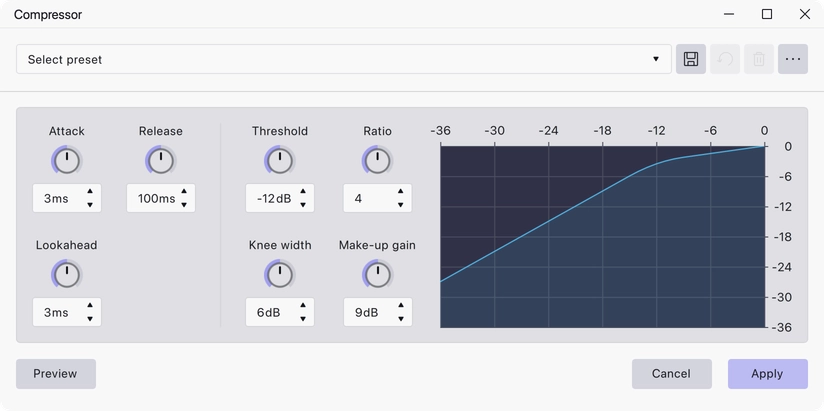
The Compressor turns down whatever crosses a threshold, by an amount set by the ratio, then lets you make the whole thing up again with gain. The result is a narrower gap between the loudest and quietest parts, which is what makes a voice track sit steadily in a mix.
Where to find it
Effect → Volume and compression → Compressor, with audio selected. The Compressor also works as a track effect: add it from a track’s effects stack to hear it live without altering the audio on disk.
Controls
Each setting is a knob with a numeric readout, and a compression curve alongside them shows the input-to-output transfer you have built.
- Threshold — the input level above which compression starts, in dB. Range −60 to 0 dB, default −12 dB.
- Ratio — how hard the signal above the threshold is pulled down. A ratio of 4 means 4 dB in becomes 1 dB out. Range 1 to 100, default 4.
- Knee width — how gradually compression comes in around the threshold, in dB. 0 gives a hard corner. Range 0 to 30 dB, default 6 dB.
- Make-up gain — a fixed gain applied after compression, in dB. Range −30 to 30 dB, default 9 dB.
- Attack — how quickly compression takes hold once the signal crosses the threshold, in ms. Range 0 to 200 ms, default 3 ms.
- Release — how quickly it lets go again, in ms. Range 0 to 1000 ms, default 100 ms.
- Lookahead — how far ahead the compressor reads so it can start acting before a transient arrives, in ms. Range 0 to 100 ms, default 3 ms.
Notes
The default make-up gain of 9 dB is not arbitrary: with the default threshold and ratio it is exactly the amount that leaves a full-scale input at full scale, so switching the effect in and out does not change the peak level.
Used as a track effect, the Compressor adds a metering panel above the knobs with Show toggles for Input, Output and Compression, so you can watch how much gain reduction is being applied while the project plays. Applied destructively from the Effect menu there is nothing to meter, and the panel is not shown.
A set of factory presets ships with the effect and can be loaded from the presets bar in the effect dialog.
Last updated